Showing posts with label shrink. Show all posts

Friday, 29 October 2010

Shrinking Datafile in steps

Shrinking a database is only desirable in migration operations e.g. restoring to an underpowered development server. If you find yourself doing it, the following link is rather useful.

The script repeatedly shrinks a data file in small increments.
This avoids long file operations and makes it easy to stop at any time.

SQLTeam.com : Shrink DB File by Increment to Target Free Space

From the script, this piece of sql is useful to show Data File Usage.

select
 [FileSizeMB] =
  convert(numeric(10,2),round(a.size/128.,2)),
 [UsedSpaceMB] =
  convert(numeric(10,2),round(fileproperty( a.name,'SpaceUsed')/128.,2)) ,
 [UnusedSpaceMB] =
  convert(numeric(10,2),round((a.size-fileproperty( a.name,'SpaceUsed'))/128.,2)) ,
 [DBFileName] = a.name
from
 sysfiles a

link : dba 101 : shrinkfile

Tuesday, 27 April 2010

DBA 101 : DBCC SHRINKFILE

WARNING : ONLY SHRINK NON LIVE DATABASES E.G TEST ENVIRONMENTS AND ONLY WHEN ABSOLUTELY NECESSARY E.G RESTORES FROM LIVE WHERE DATA SPACE IS PRE-ALLOCATED! 


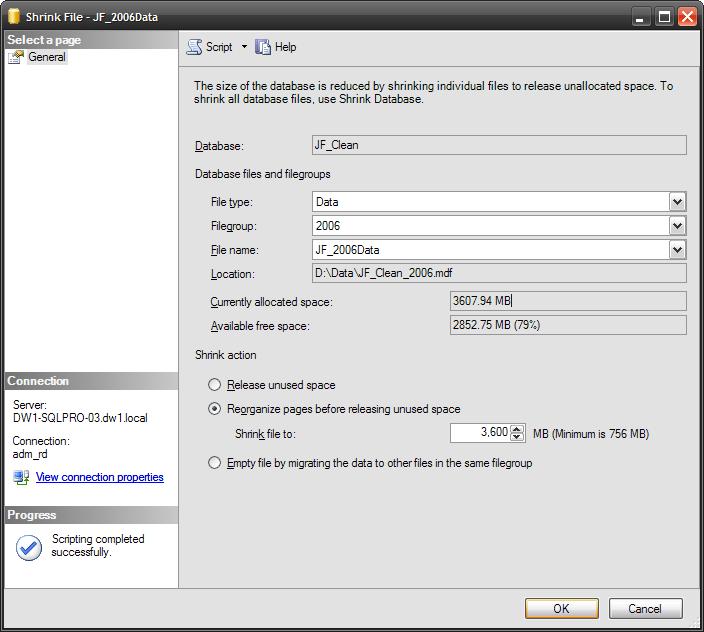
The Shrinkfile screen shown above is familiar, but what do the options do???

1) Release unused space

This uses the TRUNCATEONLY option and releases unused space at the end of the file.
No reorganization of pages occurs, i.e if empty pages exist in the middle of the file , the space will not be reclaimed.

The size '0' is scripted by Management Studio but is ignored

-- Release unused space
USE [DBName]
GO
DBCC SHRINKFILE (N'JF_2006Data' , 0, TRUNCATEONLY)
GO


2) Reorganize pages before releasing unused space

Pages are reorganized to free up all available free space. This option can take some time
Update : See this tip for shrinking a datafile in stages

-- Reorganize pages before releasing unused space
USE [DBName]
GO
DBCC SHRINKFILE (N'JF_2006Data' , 3600)
GO


3) Empty file by migrating the data to other files in the same filegroup

If other files are assigned to a filegroup , pages are distributed between those files.

-- Empty file by migrating the data to other files in the same filegroup
USE [DBName]
GO
DBCC SHRINKFILE (N'JF_2006Data' , EMPTYFILE)
GO

4) Not available from the interface - NOTRUNCATE

NOTRUNCATE is only available by TSQL.
Use it to reorganize the pages to the start of the file, but leave the datafile the same size.

-- DOES NOT Release unused space
USE [DBName]
GO
DBCC SHRINKFILE (N'JF_2006Data' , NOTRUNCATE)
GO

Friday, 3 November 2006

Shrinking Databases

This is difficult to perform without downtime as shrinking a database requires exclusive use of it.
If a database is online, the portion of the file in use is likely to be at the end of it, making reducing it's size impossible. SQL may have finished with the file and may just 'forgotten' to release this space. If this is the case, the following is worth a try.

Try the shrinkdatabase and shrinkfile methods below. They may achieve from partial to total success, depending on current activity i.e. any running processes.

Method 1 : Use the TSQL command dbcc shrinkdatabase >

i. Kill all running processes
ii. run the following sql -

dbcc shrinkdatabase (databasename, 'target percent')

Method 2 : Use the TSQL command dbcc shrinkfile to shrink the data & log files separately >

i. Kill all running processes
ii. run the following sql -

use tempdb
go
-- this command shrinks the primary data file
dbcc shrinkfile (datafile, 'target size in MB')
go
-- this command shrinks the primary data file
dbcc shrinkfile (datafilelog, 'target size in MB')
go

* you can specify a target size of 0 and SQL will shrink the file as much as it can (although the first operation on that db will inevitably trigger automatic growth)

In SQL 2005+, these tasks can be done from Management Studio by Right clicking the database, selecting 'Tasks' then 'Shrink' followed by 'Database' or 'Files'.

If the files dont shrink, identify and stop any running processes you can afford to and repeat.
Running processes can be viewed in Activity Monitor (Server > Management > Activity Monitor in Management Studio).

If they have stalled and are stuck or you simply want to stop them, right click the process and select 'Kill Process'. Then click 'Yes' to confirm.


Shrinking TempDB

TempDB is a SQL Server System Database. It is a temporary database, used both as a work area for internal processing and to store temporary objects created by users.
It is recreated each time SQL Server starts.

Method 1 (Downtime allowed) -

Stop and Start the SQL Server service.
TempDB will be recreated at its initial size as set in the Files page of the Database Properties.


Method 2 (No Downtime) -

Kill as many processes as you can afford to, and use the TSQL commands e.g.

use tempdb
go
dbcc shrinkfile (tempdev, 'target size in MB')
go
dbcc shrinkfile (templog, 'target size in MB')
go


( In SQL 2005+, this can be done from Management Studio by Right clicking the database, selecting 'Tasks' then 'Shrink' followed by 'Database' or 'Files'. )