SQL 2005
SQL Server 2005 replaces SQL Mail with Database Mail which allows you to send to a SMTP Server directly.
Enabling Database Mail on a server (via SAC | via TSQL)
Configuring Database Mail via TSQL
SQL 2000
SQL Server 2000 features two ways to access email functionality, 'SQL Mail' and 'SQLAgentMail'.
Both components are MAPI applications, hence MAPI must be present on the server e.g. through Microsoft Outlook.
Through MAPI, SQL 2000 can talk to Exchange or POP3 mail servers.
Setting this up requires Outlook to be installed on the SQL Server, configured with a mailbox and profile name (log in as the account sql runs under to do so).
How to Configure SQL Mail
http://support.microsoft.com/kb/263556
In practice, MAPI can be a real pain both in terms of setup and reliability (a must if using for system notifications).
Therefore multiple solutions exist on the web to send email via other delivery mechanisms from SQL Stored procedures.
CDONTS (think Windows NT) requires a local 'virtual' SMTP server to be installed which is configured to forward emails to a physical one.
CDOSYS (Windows 2000 onwards) can send to a local or remote SMTP server.
Both methods require elavated privileges or the sysadmin role.
CDOSYS example
How to send e-mail without using SQL Mail in SQL Server
http://support.microsoft.com/kb/312839
Friday, 29 September 2006

Saturday, 23 September 2006
NOT IN vs NOT EXISTS vs OUTER JOIN
3 ways Missing Data to locate missing data.
All are executed indentically according to the execution plan.
The third (outer join with null checking) is probably the most accedemically correct, though (IMHO) the least readable..
All are executed indentically according to the execution plan.
The third (outer join with null checking) is probably the most accedemically correct, though (IMHO) the least readable..
-- not in
select * from Sales.SalesOrderDetail
where SalesOrderID not in (select SalesOrderID from Sales.SalesOrderHeader)

-- not exists
select * from Sales.SalesOrderDetail SalesOrderDetail
where not exists (select * from Sales.SalesOrderHeader SalesOrderHeader
where SalesOrderDetail.SalesOrderID = SalesOrderHeader.SalesOrderID)

-- outer join and NULL checking
select * from Sales.SalesOrderDetail SalesOrderDetail
left outer join Sales.SalesOrderHeader SalesOrderHeader
on SalesOrderDetail.SalesOrderID = SalesOrderHeader.SalesOrderID
where SalesOrderHeader.SalesOrderID is null
Friday, 22 September 2006
SQL 2000 > 2005 Linked Server Error
" A severe error occurred on the current command. The results, if any, should be discarded. "
This occurs passing a NVARCHAR to sp_executesql on sql 2000 when linking to a 2005 instance.
Sql 2000 could not cope with the output returned by sql 2005 hence although the steps ran perfectly on their own.
It is confirmed as a bug. I simply reversed my plan and ran the script from sql2005 performing the remote call on the sql 2000 databases.
http://support.microsoft.com/kb/896373
This occurs passing a NVARCHAR to sp_executesql on sql 2000 when linking to a 2005 instance.
Sql 2000 could not cope with the output returned by sql 2005 hence although the steps ran perfectly on their own.
declare @chvDataBaseName varchar(100)
declare @sql nvarchar(2000)
set @chvDataBaseName = 'northwind'

-- backup on local server

set @sql = N' BACKUP DATABASE ' + @chvDataBaseName
set @sql = @sql + ' TO DISK = N''d:\tempmigrationfolder\'
set @sql = @sql + @chvDataBaseName + '.BAK'' WITH NOFORMAT, INIT,'
set @sql = @sql + ' NAME = N''Full Database Backup'','
set @sql = @sql + ' SKIP, NOREWIND, NOUNLOAD, STATS = 10'
print @sql
execute linked2005server.master.sp_executesql @sql
It is confirmed as a bug. I simply reversed my plan and ran the script from sql2005 performing the remote call on the sql 2000 databases.
http://support.microsoft.com/kb/896373
Saturday, 16 September 2006
SQL 2005 : Database Mail
Msg 15281, Level 16, State 1, Procedure sp_send_dbmail, Line 0 "SQL Server blocked access to procedure 'dbo.sp_send_dbmail' of component 'Database Mail XPs' because this component is turned off as part of the security configuration for this server. A system administrator can enable the use of 'Database Mail XPs' by using sp_configure. For more information about enabling 'Database Mail XPs', see "Surface Area Configuration" in SQL Server Books Online. "
By default, Database Mail is not enabled when SQL 2005 is installed.
You can enable it by the Surface Area Configuration Tool or by TSQL.
By default, Database Mail is not enabled when SQL 2005 is installed.
You can enable it by the Surface Area Configuration Tool or by TSQL.
Friday, 15 September 2006
Enabling Database Mail via TSQL
-- allow advanced options

sp_configure 'show advanced options', 1;
GO
RECONFIGURE;
GO

-- enable database mail (0 disables , 1 enables)

sp_configure 'Database Mail XPs', 1;
GO
RECONFIGURE
GO

-- hide advanced options again

sp_configure 'show advanced options', 0;
GO
RECONFIGURE;
GO
Thursday, 14 September 2006
Enabling Database Mail via Surface Area Configuration
1) Launch Surface Area Configuration >
Start > Programs > Microsoft SQL Server 2005 > Configuration Tools > SQL Server Surface Area Configuration Tool
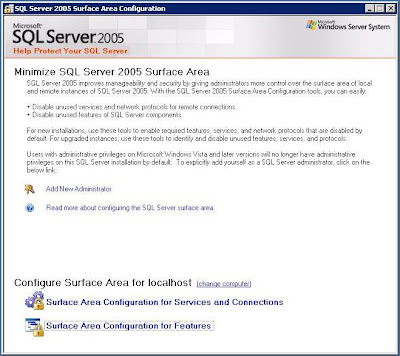
2) Open 'Surface Area Configuration for Features' (text link at bottom of page)
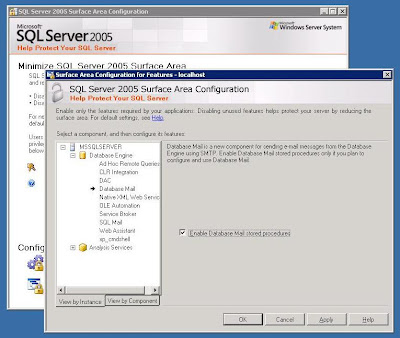
Click Database Mail and place an tick in the 'Enable Database Mail Stored Procedures'.
Click Apply then OK.
Start > Programs > Microsoft SQL Server 2005 > Configuration Tools > SQL Server Surface Area Configuration Tool

2) Open 'Surface Area Configuration for Features' (text link at bottom of page)

Click Database Mail and place an tick in the 'Enable Database Mail Stored Procedures'.
Click Apply then OK.
Sunday, 10 September 2006
Float as Varchar (Not Scientific)
Formatting a float in varchar but NOT in scientific notation
SELECT CONVERT(varchar(100), CAST(@testFloat AS decimal(38,2)))or
SELECT STR(@testFloat, 38, 2)
Subscribe to:
Posts (Atom)