Excellent Link on SSC today, 'Free Tools for the SQL Server DBA'
http://www.sqlservercentral.com/articles/Tools/64908/
As a result I'm now using 'SQL Heartbeat'...
http://sqlsolutions.com/products/Heartbeat/index.html
...and am trying out 'Microsoft XML Notepad'
http://www.microsoft.com/downloads/details.aspx?familyid=72d6aa49-787d-4118-ba5f-4f30fe913628&displaylang=en
update Nov 2010 :
Both now added to my 'Free SQL Server Stuff' page.
Friday, 22 January 2010

Monday, 18 January 2010
TSQL : Using NTILE to divide a results set up.
NTILE is a ranking function which can be used to divide up results into groups of equal volume.
To demonstrate I use NTILE (4) to distribute the Adventureworks Contact table into 4 groups.
In reality I'm using it to divide a job queue between different paths in a SSIS package, to achieve a level of parallel execution.
I'm sure there are better ways, which I'll blog when I find them.
To demonstrate I use NTILE (4) to distribute the Adventureworks Contact table into 4 groups.
SELECT
[ContactID]
, [NameStyle]
, [Title]
, [FirstName]
, [MiddleName]
, [LastName]
, NTILE (4)  OVER ( ORDER BY [ContactID] )  As Process
FROM [AdventureWorks].[Person].[Contact]
In reality I'm using it to divide a job queue between different paths in a SSIS package, to achieve a level of parallel execution.
I'm sure there are better ways, which I'll blog when I find them.
Sunday, 17 January 2010
SSIS : Passing variables to sql
Creating Sql strings to pass variables through to Sql Server >
T-SQL
"SET FMTONLY OFF; SELECT TOP "+ (DT_STR, 8,1252) @[User::RowBatchSize] +" * FROM [dbo].[sourceData] WHERE loadId > " + (DT_STR, 8,1252) @[User::LastProcessedID]
Executing a Stored Procedure
"SET FMTONLY OFF; EXEC dbo.dataLoad @rows = "+ (DT_STR, 8,1252) @[User::RowBatchSize] +",@loadId = "+ (DT_STR, 8,1252) @[User::LastProcessedID]
To use this method >
1) Create a variable
2) Set the variable property 'EvaluateAsExpression' to 'True'
3) Set the expression with your sql statement (see examples above)
You can use this in either the Control flow or Data Flow.
In a Control Flow >
i. Add an Execute SQL Task
ii. Set the 'SQL Source Type' to 'Variable'
iii. Set the SourceVariable to the variable name
or
In a Data Flow >
i. Add a OLE DB Source and open the OLE DB Source Editor.
ii. Set 'Data Access Mode' to 'SQL Command from Variable'.
iii. Set the 'Variable Name' to ooh.... the name of the variable containing the expression!
T-SQL
"SET FMTONLY OFF; SELECT TOP "+ (DT_STR, 8,1252) @[User::RowBatchSize] +" * FROM [dbo].[sourceData] WHERE loadId > " + (DT_STR, 8,1252) @[User::LastProcessedID]
Executing a Stored Procedure
"SET FMTONLY OFF; EXEC dbo.dataLoad @rows = "+ (DT_STR, 8,1252) @[User::RowBatchSize] +",@loadId = "+ (DT_STR, 8,1252) @[User::LastProcessedID]
To use this method >
1) Create a variable
2) Set the variable property 'EvaluateAsExpression' to 'True'
3) Set the expression with your sql statement (see examples above)
You can use this in either the Control flow or Data Flow.
In a Control Flow >
i. Add an Execute SQL Task
ii. Set the 'SQL Source Type' to 'Variable'
iii. Set the SourceVariable to the variable name
or
In a Data Flow >
i. Add a OLE DB Source and open the OLE DB Source Editor.
ii. Set 'Data Access Mode' to 'SQL Command from Variable'.
iii. Set the 'Variable Name' to ooh.... the name of the variable containing the expression!
Friday, 15 January 2010
Enabling Data Compression in Scripts generated from Management Studio 2008
1) On the Management Studio menu bar, navigate to 'Tools > Options'
The following menu then appears >
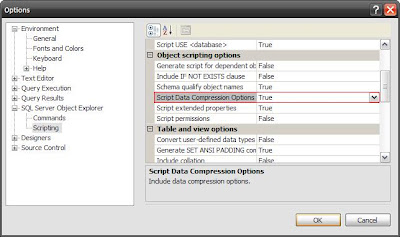
2) Expand 'SQL Server Object Explorer' , click 'Scripting'
3) Scroll down to 'Object Scripting Options' and change 'Script Data Compression Options' to TRUE
Useful link :
SQL 2008 Management Studio - Scripting Improvements
The following menu then appears >

2) Expand 'SQL Server Object Explorer' , click 'Scripting'
3) Scroll down to 'Object Scripting Options' and change 'Script Data Compression Options' to TRUE
Useful link :
SQL 2008 Management Studio - Scripting Improvements
Thursday, 14 January 2010
Free Training on SQL Server DMVs
On Wednesday 3rd March , Courtesy of Quest ... http://www.vconferenceonline.com/shows/spring10/quest/register/multireg.asp
Saturday, 9 January 2010
SSIS Control Flow : Precedence Constraints
Example & syntax of how to use utilise Precedence Constraints in the control flow >

Checking a condition goes like this >
@[User::ProcessChanges] == 1
(ProcessChanges is a user defined variable in the above package).
http://www.simple-talk.com/sql/ssis/working-with-precedence-constraints-in-sql-server-integration-services/

Checking a condition goes like this >
@[User::ProcessChanges] == 1
(ProcessChanges is a user defined variable in the above package).
http://www.simple-talk.com/sql/ssis/working-with-precedence-constraints-in-sql-server-integration-services/
Saturday, 2 January 2010
Goals for 2010
Improve my web presence -
- Tidy sqlsolace, improve tagging and searchability
- Review (& potentially post) my backlog of scripts and notes
- Review and remove old/unprofessional material from my personal web site
- Publish further scripts on other sites (September 2009 : had 1st published on SSC)
- Publish an article
- Attend more SQL Server events
- Network more
- Continue with SSIS development to further my ETL skills.
- Obtain Microsoft BI certifications
- Tackle the mountain of books, whitepapers and printed articles in my office.
Subscribe to:
Posts (Atom)