It's widely known that setting up tracing via sql scripts is far more desirable than using Profiler and watching in real time.
Linchi Shea has taken the trouble of posting on exactly that subject >
Linchi Shea : Performance Impact: Profiler Tracing vs. Server Side SQL Tracing
Tuesday, 22 June 2010

Friday, 18 June 2010
Thursday, 17 June 2010
Bookmark : SSIS Expression Editor & Tester
Allan Mitchell and Darren Green of SQLIS/Konesans have developed a tool for editing and testing SSIS Expressions.
If you've ever used SSIS in depth, you'll appreciate just how helpful this will be.
It's hosted over on codeplex >
CodePlex : SSIS Expression Editor & Tester
Thanks guys, will be trying it out shortly.
If you've ever used SSIS in depth, you'll appreciate just how helpful this will be.
It's hosted over on codeplex >
CodePlex : SSIS Expression Editor & Tester
Thanks guys, will be trying it out shortly.
Tuesday, 15 June 2010
Goals for 2010 :Update
Back in January, I set myself some goals. Now we’re half way through 2010, it’s time to review what I’ve (not) achieved...
Improve my web presence -
Tidy sqlsolace, improve tagging and searchability -
Achieved : 30 posts from old notes
To do : 20 posts (have text files and screenshots to support these ready)
Achieved : Nothing!
To do : As above. Need to be strict and review content for relevance and professionalism.
Community -
Publish further scripts on other sites (September 2009 : had 1st published on SSC) -
Achieved : Have had a further 4 scripts published @ SQLServerCentral
To do : Am aiming for a further 10 this year
Achieved : Nothing!
To do : Write one and get it published!.
Achieved : 1 (SQLBits VI in London, April 2010)
To do : More!!!
Achieved : LinkedIn connections with people I’ve genuinely worked with and respect. I don’t see the value of randomly adding others I cannot vouch for.
To do : More (real contacts, outside of Linked-in and the blogosphere)
Learning –
Achieved : 3 SSIS Solutions are now in production
To do : More Advanced SSIS
There are 2 barriers to achieving this goal –
1) business requirements and data volume levels are not yet requiring it.
2) our disk subsystem (purchased by a previous incumbent to my role) makes parallel processing difficult to explore.
Acheived : Nothing!
To do : Start learning!
Achieved :Couple of chapters of SQL Server MVP Deep Dives
Half of Inside Microsoft SQL Server 2008 T-SQL Querying
Reading technical books is proving more difficult than I thought, due to -
Improve my web presence -
Tidy sqlsolace, improve tagging and searchability -
Achieved :
- I’ve added fixed ‘pages’ to my blog (look up, the categories at the top!) These make it easy to find frequently accessed material. Pages are a new blogger feature.
- A published search widget from google (search box on the right hand side) is proving far more effective than the blogger one at the top of the page.
- I’ve also gone back and manually tagged a fair few posts I published without categorising.
- Continue categorising / tagging posts
- Review old posts for duplicate content, typos etc.
- Produce more 101 posts and summary pages, deep linking older content.
Achieved : 30 posts from old notes
To do : 20 posts (have text files and screenshots to support these ready)
Review and remove old/unprofessional material from my personal web site
Achieved : Nothing!
To do : As above. Need to be strict and review content for relevance and professionalism.
Community -
Publish further scripts on other sites (September 2009 : had 1st published on SSC) -
Achieved : Have had a further 4 scripts published @ SQLServerCentral
To do : Am aiming for a further 10 this year
Publish an article
To do : Write one and get it published!.
Attend more Sql Server events / meetups
To do : More!!!
Network more
To do : More (real contacts, outside of Linked-in and the blogosphere)
Learning –
Continue with SSIS development to further my ETL skills.
Achieved : 3 SSIS Solutions are now in production
To do : More Advanced SSIS
There are 2 barriers to achieving this goal –
1) business requirements and data volume levels are not yet requiring it.
2) our disk subsystem (purchased by a previous incumbent to my role) makes parallel processing difficult to explore.
Obtain Microsoft BI certifications
Acheived : Nothing!
To do : Start learning!
Tackle the mountain of books, whitepapers and printed articles in my office.
Achieved :
Half of Inside Microsoft SQL Server 2008 T-SQL Querying
Reading technical books is proving more difficult than I thought, due to -
- Limited personal time (young kids at home)
- Even less quality time (trying to start a book at 8pm when kids are in bed and my brain is mush)
- I find myself making notes on the content I read
- I stop reading to try out scripts and ideas.
Monday, 14 June 2010
Sharing for anonymous access - Enabling the guest account on Windows 2008
In Windows 2008 the Guest account diasbled by default.
No matter what permissions i gave a share or NTFS permissions on the folder, I could not access it without a login prompt.
Users were crossing from a (deliberately) untrusted domain on a separate network.
I don't use anonymous access usually, but this was just as a file store.
It was resolved by >
Enabling the guest account on Windows 2008
* Computer Management > Local Users and Groups > Users
* Right click Guest > Properties
* Untick "Account is disabled"
No matter what permissions i gave a share or NTFS permissions on the folder, I could not access it without a login prompt.
Users were crossing from a (deliberately) untrusted domain on a separate network.
I don't use anonymous access usually, but this was just as a file store.
It was resolved by >
Enabling the guest account on Windows 2008
* Computer Management > Local Users and Groups > Users
* Right click Guest > Properties
* Untick "Account is disabled"
Friday, 11 June 2010
Windows 7 Home Premium - No Remote Desktop!!!!
Got a new Acer Aspire Revo today to use for movies and music.
Windows 7 Home Premium came preinstalled, along with at least 20 games and other bloatware I had to uninstall!
Anyway, I digress. The real issue is the absence of RDP (remote desktop) on the pc. I was relying on this to be able to administer remotely (leaving the tv unaffected).
Fortunately I don't appear to be alone in wanting this functionality, and a quick search revealed other's frustrations and (of course) a solution....
Windows 7 RTM concurrent remote desktop patch
http://thegreenbutton.com/forums/t/79427.aspx
Windows 7 Home Premium came preinstalled, along with at least 20 games and other bloatware I had to uninstall!
Anyway, I digress. The real issue is the absence of RDP (remote desktop) on the pc. I was relying on this to be able to administer remotely (leaving the tv unaffected).
Fortunately I don't appear to be alone in wanting this functionality, and a quick search revealed other's frustrations and (of course) a solution....
Windows 7 RTM concurrent remote desktop patch
http://thegreenbutton.com/forums/t/79427.aspx
Windows Update Settings via Group Policy
Here I show how to use Group Policy to set Windows Update settings.
This is using Windows 2008 Active Directory.
1) Create a security group for the to place computers to be updated -

2) I've chosen to create a GPO for the settings -

3) Navigate to -
Computer Configuration > Policies > Administrative Templates > Windows Components > Windows Updates

Configure the settings as follows -
4) Configure Automatic Updates -
I've chosen to download and install every day at 20:00.
NB : If the download source is Windows Update then this would be a daft setting as it is uncontrollable.
I'm using an internal WSUS server to control updates so this setting will only apply updates at 20:00 on the day they have been authorized for the computer.

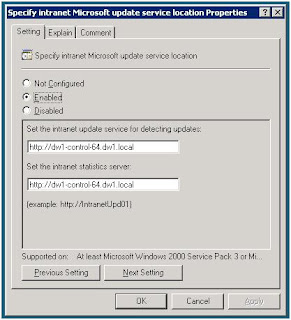
5) Specify intranet Microsoft update service location -
The address of the WSUS instance.
6) Automatic Updates detection frequency -
Fairly self explanatory, how often to check update source.

7) Allow Automatic Updates immediate installation -
Again, self explanatory - install straight after updates?

8) Enable client-side targeting -
Specify the group created in step 1.

This is using Windows 2008 Active Directory.
1) Create a security group for the to place computers to be updated -

2) I've chosen to create a GPO for the settings -

3) Navigate to -
Computer Configuration > Policies > Administrative Templates > Windows Components > Windows Updates

Configure the settings as follows -
4) Configure Automatic Updates -
I've chosen to download and install every day at 20:00.
NB : If the download source is Windows Update then this would be a daft setting as it is uncontrollable.
I'm using an internal WSUS server to control updates so this setting will only apply updates at 20:00 on the day they have been authorized for the computer.

5) Specify intranet Microsoft update service location -
The address of the WSUS instance.

6) Automatic Updates detection frequency -
Fairly self explanatory, how often to check update source.

7) Allow Automatic Updates immediate installation -
Again, self explanatory - install straight after updates?

8) Enable client-side targeting -
Specify the group created in step 1.

Subscribe to:
Posts (Atom)