Semaphore? I thought that was men waving flags...
Some SSIS load packages failed this morning >
Error 121: "The semaphore timeout period has expired" (ERROR_SEM_TIMEOUT).
There is no one answer to this except to say that is a tcp/ip networking error.
Newsgroup posts on the issue range from antivirus software, network congestion and black hole routers. If anyone can be less vague, i'd love to hear your thoughts.
http://support.microsoft.com/kb/325487
Friday, 30 November 2007

Wednesday, 21 November 2007
DMV Performance Counters - Buffer Cache hit ratio example
Demonstrates the dmv, sys_dm_os_performance_counters.
Returns a single value, i.e. the buffer cache hit ratio.
This represents how well pages stay in buffer cache.
The closer the result is to 100%, the better.
Corrected from version here
This version -
Returns a single value, i.e. the buffer cache hit ratio.
This represents how well pages stay in buffer cache.
The closer the result is to 100%, the better.
Corrected from version here
This version -
- includes the necessary join
- will run on any server (wildcarded the server name)
SELECT (a.cntr_value * 1.0 / b.cntr_value) * 100.0 [BufferCacheHitRatio]
FROM (SELECT *, 1 x
     FROM sys.dm_os_performance_counters
    WHERE counter_name = 'Buffer cache hit ratio'
      AND object_name like '%:Buffer Manager%') a
JOIN
  (SELECT *, 1 x
  FROM sys.dm_os_performance_counters
    WHERE counter_name = 'Buffer cache hit ratio base'
      AND object_name like '%Buffer Manager%') b
ON a.x = b.x
Tuesday, 13 November 2007
Examining SQL Column types (2005+)
select o.type_desc, o.name, c.name, t.name , c.max_length, c.precision
from sys.columns c
inner join sys.types t
on c.system_type_id = t.system_type_id
inner join sys.objects o
on  c.object_id = o.object_id
where o.type_desc not like 'system%'
and o.type_desc not like 'int%'
order by 1,2,3,4
Saturday, 10 November 2007
TSQL : Agent Job Notififications via email
A quick run through of setting email notifications for emails
1) Set Sql agent to use a database mail profile.
2) Add an operator (email recipient) for the alerts.
3) Set the jobs to send emails on failure.
1) Set Sql agent to use a database mail profile.
-- Set default database mail profile for sql agent
-- My dbamail profile name is 'SQL Operator'

USE [msdb]
GO
EXEC master.dbo.xp_instance_regwrite N'HKEY_LOCAL_MACHINE', N'SOFTWARE\Microsoft\MSSQLServer\SQLServerAgent', N'DatabaseMailProfile', N'REG_SZ', N'SQL Operator'
GO
2) Add an operator (email recipient) for the alerts.
-- Add Operator Recipient for Sql Agent jobs
USE [msdb]
GO
EXEC msdb.dbo.sp_add_operator @name=N'Agent Job Operator',
  @enabled=1,
  @pager_days=0,
  @email_address=N'dba@mydomain.co.uk'
GO
3) Set the jobs to send emails on failure.
USE [msdb]
GO
sp_update_job
select 'exec sp_update_job @job_name =  '''+name+''' , @notify_email_operator_name = ''Agent Job Operator'' , @notify_level_email = 2'
from msdb.dbo.sysjobs
where enabled = 1
/*
note values for @notify_level_email signify when to send emails are -
0 - never
1 - success
2 - failure
3 - always
*/
Moving TempDB / Splitting TempDB to multiple files
Script as below.
You need to restart SQL for tempdb to be recreated in the new locations...
You need to restart SQL for tempdb to be recreated in the new locations...
USE master
GO

-- move tempdb data
ALTER DATABASE tempdb
MODIFY FILE (NAME = tempdev,
FILEGROWTH = 10% ,
MAXSIZE = UNLIMITED,
SIZE=1000MB ,
FILENAME = 'D:\databases\tempdb_1.mdf')
GO

-- move tempdb log
ALTER DATABASE tempdb
MODIFY FILE (NAME = templog, SIZE=1, FILENAME = 'D:\databases\templog.ldf')
GO

-- additional processor? split tempdb into equal filesizes, 1 per processor...

ALTER DATABASE tempdb ADD FILE
(NAME = tempdev_2,
FILEGROWTH = 10% ,
MAXSIZE = UNLIMITED,
SIZE=1000MB ,
FILENAME = 'D:\databases\tempdb_2.mdf')
GO
Wednesday, 7 November 2007
Configuring Event Forwarding - All events
USE msdb
go

EXEC master.dbo.sp_MSsetalertinfo
  @forwardingserver=N'test',
  @forwardalways=1,
  @forwardingseverity=10
go
Saturday, 3 November 2007
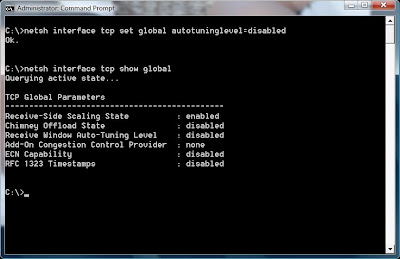
Vista : Disable TCP Window Scaling
TCP Window Scaling is a feature of Vista (& Windoze 2008 next year) that allows the intelligent use of a larger packet size when transferring data between hosts that support it.
The trouble is, not many hosts support it and some routers also dont like it.
The end result is people experiencing slow networking on Vista.
Turn it off like this (from Administrator command prompt) >
netsh interface tcp set global autotuninglevel=disabled
Check the status like this >
netsh interface tcp show global
A nice pretty screenshot >
The trouble is, not many hosts support it and some routers also dont like it.
The end result is people experiencing slow networking on Vista.
Turn it off like this (from Administrator command prompt) >
netsh interface tcp set global autotuninglevel=disabled
Check the status like this >
netsh interface tcp show global
A nice pretty screenshot >

Subscribe to:
Posts (Atom)