Showing posts with label networking. Show all posts

Tuesday, 3 August 2010

SQL Server & Network Packet Size

I've seen a number of references to packet size on my research into optimising SQL & SSIS.
The default packet size is 512 Bytes and the maximum SQL server supports is 32767.

So, the question is, " Why can't i just change it ? "

Hardware support is the answer
Connecting clients and the network switches need to support the packet size (e.g. 9000 for Jumbo frames)
Network Cards need to support the speed (and for that support to be enabled via the drivers in Windows)

Your OS also needs to support it. In the case of Hyper-V (pre Windows 2008 R2), the virtual NIC cannot support Jumbo frames.

If your environment is suitable however, here's the configuration code to do it >

EXEC SP_CONFIGURE 'show advanced option', '1'; 
RECONFIGURE;
EXEC SP_CONFIGURE;

EXEC SP_CONFIGURE 'network packet size (B)', '9000';
RECONFIGURE WITH OVERRIDE;
RECONFIGURE;

EXEC SP_CONFIGURE

Link : Gigabit Ethernet Jumbo Frames

Friday, 7 August 2009

SQL Network Interfaces, error: 26 - Error Locating Server/Instance Specified

Was faced with this error today when configuring a new server,
" SQL Network Interfaces, error: 26 - Error Locating Server/Instance Specified "


So, after checking that your Browser service is up and running, is it accessible?  By this I mean, not blocked by a firewall, ISA etc,
PortQry is a free tool to help determine this (a bit more advanced than telneting)

You use it like this >

portqry.exe -n yourservername -p UDP -e 1434


Links :

Download PortQry version 2
MSDN blogs

Tuesday, 11 November 2008

Hyper-V VM : Removing Hidden Network Adapter!

"The IP address 10.0.20.31 you have entered for this network adapter is already assigned to another adapter 'Microsoft Virtual Machine Bus Network Adapter #2' 'Microsoft Virtual Machine Bus Network Adapter #2' is hidden from the Network Connections folder because it is not physically in the computer. If the same address is assigned to both adapters and they both become active, only one of them will use this address. This may result in incorrect system configuration. Do you want to enter a different IP address for this adapater in the list of IP addreses in the Advanced dialog box?"

By changing the virtual network on the Hyper-V host, I have managed to create a ghost network adapter in my hyper-v VM!

To see the hidden adapter >

1. launch command prompt - start > run > cmd [enter]
2. type set devmgr_show_nonpresent_devices=1 [enter]
3. type start devmgmt.msc [enter]
4. from menu bar select 'View' drop down and select 'Show hidden devices'

To remove the (now visible) adapter >

1. locate the adapter in device manager under 'network adapters'
2. right-click it and select 'uninstall device'
3. reboot

http://blog.mpecsinc.ca/2008/02/sbs-shadowprotect-some-hardware.html

Friday, 10 October 2008

Networking Basics - Network Clients

Installing the Hyper-V role seems to make Windows 2008 a little forgetful at times about it's network settings. On a couple of occasions I've returned to my NIC configuration to find network settings missing.

If you cannot connect to a server, check it has 'File and Printer Sharing' enabled as below >


If your server cannot see others on the network, check 'Client for Microsoft Networks' is enabled.

Tuesday, 29 April 2008

Windows 2008 : Networking Eccentricity

My 2008 Server cannot be seen by any client other than itself.
It only ‘sees’ my Vista instance (and LLTD enabled router) when browsing the mshome workgroup. This was working fine, so maybe my Hyper-V install has messed things up…
On inspecting the Local Area Connection Properties, ‘Client for Microsoft Networks’ was unticked. Weird. Could swear it was enabled! Simply clicking the tickbox worked fine. When I clicked OK however, the following appeared >
" Your current selection will also disable the following features: Client for Microsoft Networks "
" Are you sure you want to disable these feature(s)? "

This makes NO sense at all. I’m trying to ENABLE not disable the client!
A clash with the windows virtualisation clients was my first thought, but disabling those did not improve matters.
I can still establish an RDP session by both ip address and network name, its just the visbility.
After a lot of googling, following multiple sets of instructions and hints (there aren’t too many people playing with windows 2008 right now), I decided to start again.
I uninstalled as much as I could, namely >
Client for Microsoft Networks
File and Printer Sharing for Microsoft Networks
Link-Layer Topology Discovery Responder
Link-Layer Topology Discovery Mapper I/O Driver
Virtual Machine Network Services (installed by Hyper-V)
Microsoft Virtual Network Switch Protocol (installed by Hyper-V)
And then rebooted.
On startup, I installed them all again, one by one and….. it worked. My xp and 2003 clients appeared.
Update October 2008 >
Another fix is simply to uninstall the network cards, reboot and let Windows sort itself out.
(still have to put the IP config back in).

Update July 2010 >
An easier fix if you can find the advanced properties of the network cards.

Monday, 24 March 2008

Windows Vista & 2008 Network Map

Windows Vista & 2008 Network Map

Despite having run Vista for 9 months now, it wasn’t until playing with 2008 that I finally felt the need to draw a pretty map of a network.

Firstly, I tried to enable ‘Network Discovery’ in 2008’s ‘Network and Sharing Center’ by selecting ‘Turn on network discovery’ and clicking ‘Apply’. The default setting of ‘custom’ was preserved. I could turn off Network discovery, but the nearest I could get to turning it on, was ‘custom’.

After a lot of googling I finally got ‘network discovery’ to stay on by enabling 2 services –

‘SSDP Discovery’ and ‘UPnP Device Host’. These changes meant that 2 new entries appeared in the Network list, namely tsclient (presumably representing a terminal service) and my Netgear router).

To see the network map in either Vista or 2008, go to ‘Network and Sharing Center’ and click the ‘View full map’ in the top right of the window. My first attempt from a Vista laptop is shown here >
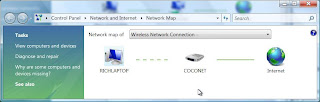

Not much of a network map, I’m sure you’ll agree.

On powering up the rest of my network, the situation only improved slightly with the addition of the 2008 box.


Getting XP & 2003 ‘on the map’...

Wikipedia provides a concise explanation that Network mapping is provided by the Link Layer Topology Discovery protocol or LLTD (like we need another acronym…) (http://en.wikipedia.org/wiki/Link_Layer_Topology_Discovery)

The Vista & 2008 Os' use LLTD to provide the map. Basically I needed to install LLTD on pre vista/2008 clients. For XP, this was simple enough. XP has an update to install the LLTD protocol (kb922120) http://support.microsoft.com/kb/922120/

For 2003, no such update exists, so the issue has to be forced >

1) Run the KB922120 installer on the 2003 machine (it is going to fail, but stick with me here...)
2) Ignore the error message, but dont press OK to quit the installer.
3) Look on the root of your drive for a crazily named installer folder (was 4e3502ace711713573322646a0e29dbb on mine) and copy the contents elsewhere.
4) Now press OK to quit the installer.
5) Configure your nic (right click network card and select properties).
6) Add a protocol, go to 'have disk' and navigate to wherever the installer files are saved.
7) From the SPCGDR\IP\ subfolders locate the .inf file and click OK.

This will install LLTD and the 2003 box will now be part of the network map.


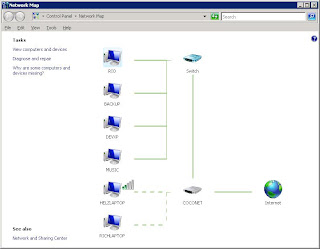
My 2008 Network Map >


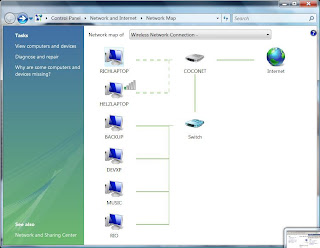
My Vista Network Map >
Tuesday, 18 March 2008

Windows 2008 : NAP - Network Access Protection

This is a new Windows 2008 'Platform' for ensuring the security of the network by controlling client access to it.
Microsoft defines 3 functions of NAP, namely >
Health State Validation - Monitoring of client machines
Health Policy Compliance - Pushing out software updates & patches to non compliant machines.
Limited Access - Define what operations (if any), client machines can perform.
NAP is particularly good for laptops as by their portable nature, they are not always connected to a company network.

Friday, 21 December 2007

SPN - Service Principal Name Registration

SPN is a attribute of an Active Directory computer account. It ties together the machine name, a service account and the port number.

We need a SPN established to allow Kerberos authentication with SQL.
Kerberos allows pass through authentication eg user > web server > sql server

You want to create an spn for a sql instance when the account that sql server runs from does not have rights to create an SPN (most cases really, in secure environments).

To manually configure an SPN you need 'setspn', which is part of 'Windows 2000 / 2003 Resource Kit'. Once installed >
C:\Program Files\Resource Kit>setspn
Usage: setspn [switches data] computername
Where "computername" can be the name or domain\name

Switches:
-R = reset HOST ServicePrincipalName Usage: setspn -R computername
-A = add arbitrary SPN Usage: setspn -A SPN computername

-D = delete arbitrary SPN Usage: setspn -D SPN computername
-L = list registered SPNs Usage: setspn [-L] computername

Examples:

setspn -R daserver1 It will register SPN "HOST/daserver1" and "HOST/{DNS of daserver1}"
setspn -A http/daserver daserver1
It will register SPN "http/daserver" for computer "daserver1"
setspn -D http/daserver daserver1
It will delete SPN "http/daserver" for computer "daserver1"

Adding a SPN > setspn - A SERVICENAME/FQDN serviceaccount
C:\Program Files\Resource Kit>setspn -A MSSQLSvc/livesql001.domain.co.uk SqlServiceAccount
Registering ServicePrincipalNames for CN=SqlServiceAccount,OU=Service Accounts,DC=domain,DC=co,DC=uk
MSSQLSvc/livesql001.domain.co.uk Updated object
C:\Program Files\Resource Kit>setspn -A MSSQLSvc/livesql001.domain.co.uk:1433 SqlServiceAccount
Registering ServicePrincipalNames for CN=SqlServiceAccount,OU=Service Accounts,DC=domain,DC=co,DC=uk MSSQLSvc/livesql001.domain.co.uk:1433 Updated object

Checking an SPN > setspn -l serviceaccount
C:\Program Files\Resource Kit>setspn -l SqlServiceAccount

Registered ServicePrincipalNames for CN=SqlServiceAccount,OU=Service Accounts,DC=domain,DC=co,DC=uk: MSSQLSvc/livesql001.domain.co.uk:1433 MSSQLSvc/livesql001.domain.co.uk MSSQLSvc/livesql002.domain.co.uk:1433 MSSQLSvc/testsql002.domain.co.uk:1433 MSSQLSvc/livesql002:1433 MSSQLSvc/devsql001.domain.co.uk:1433

You can also check an spn via adsi edit (Active Directory editor tool).

Technet explanation on SPNs >
http://technet2.microsoft.com/windowsserver/en/library/8127f5ed-4e05-4822-bfa9-402ceede47441033.mspx?mfr=true

So, SPN ties together -
  • machine name
  • port number
  • account name
for active directory.

Sunday, 9 December 2007

SQL Server Default Port Numbers

135 – SQL Debugger

1433 – SQL Server

1434 – SQL Browser

2383 – Analysis Services

4022 – Service Broker

Friday, 30 November 2007

SSIS : The semaphore timeout period has expired

Semaphore? I thought that was men waving flags...

Some SSIS load packages failed this morning >

Error 121: "The semaphore timeout period has expired" (ERROR_SEM_TIMEOUT).

There is no one answer to this except to say that is a tcp/ip networking error.

Newsgroup posts on the issue range from antivirus software, network congestion and black hole routers. If anyone can be less vague, i'd love to hear your thoughts.

http://support.microsoft.com/kb/325487

Tuesday, 23 October 2007

Vista : Where is telnet?

For some bizarre reason, telnet is not installed by default on Vista. How to get it back >


1) Start > Control Panel > Programs and Features

2) Look on left hand task pane and click 'Turn Windows Features on or off'

3) Locate and enable 'Telnet Client' in the list that appears.

4) Click OK and wait (for what seems like an eon)

Proceed to command prompt and use telnet like in the good old days :)

Thursday, 30 August 2007

Login Failures : Blank Username

Login failed for user ''. The user is not associated with a trusted SQL Server connection.

This occurs on own or in conjuction with other errors , e.g. SSPI.
Bottom line is that it is a Windows Authentication error.

Therefore, nag the networks team or get stuck in with debugging yourself...

Sunday, 26 August 2007

List SQL Instances on the network

List SQL Instances on the network >

c:\> osql -L

Only discovers servers that want to be found, i.e. where the SQL browser service is broadcasting their existance, and they are on the same subnet etc

Thursday, 2 November 2006

Networking : Black Hole Router

Matter entering a black hole in space is never seen again.
Ditto for network packets entering a 'Black Hole Router'.

A black hole router is one that simply drops packets destined for an ip address without even reporting that the host is not reachable.

http://en.wikipedia.org/wiki/Black_hole_%28networking%29